Online CFD simulation for airfoils & race car wings
CFD uses a computer to predict how air flows around your wing: where pressure builds, where the flow speeds up and where it separates. Aero Design Studio runs OpenFOAM-based 2D CFD in your browser. You see the whole flow field instead of a single polar, at a fraction of what desktop and cloud tools cost, and quickly enough to try several ideas in an afternoon.
CFD: 150 tokens every month with the Pro plan, from €15 a month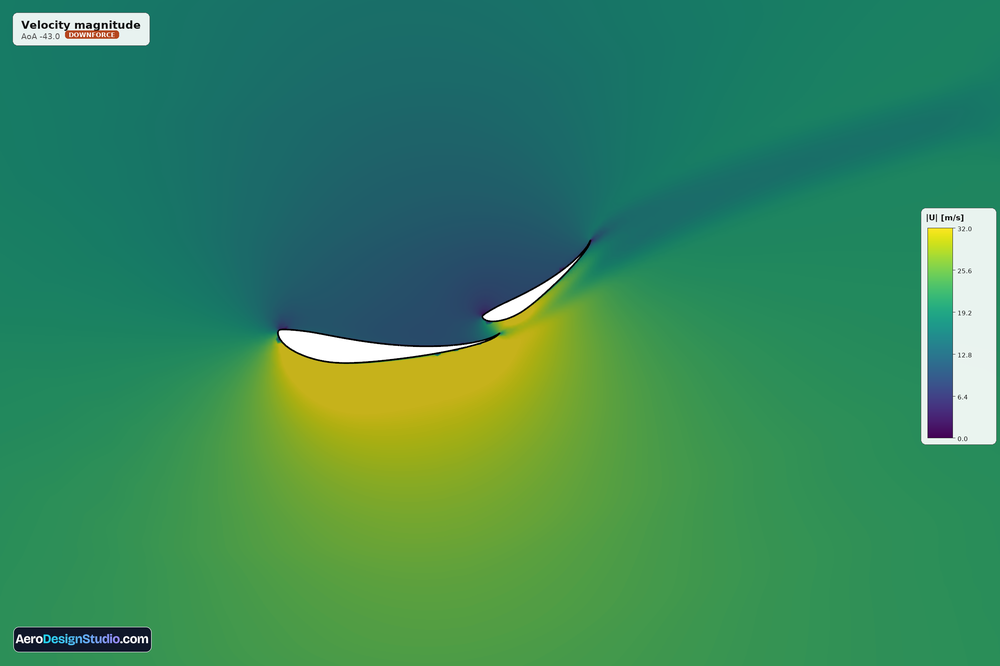
What is CFD?
Computational Fluid Dynamics solves the equations of airflow on a computer. Instead of a wind tunnel, the software fills the space around your wing with a fine grid of tiny cells and works out the speed and pressure of the air in each one until the whole flow field settles.
The result is a map of exactly what the air is doing: where it accelerates, where the pressure drops to make downforce, and where it separates and stalls. From that map you get the numbers that matter (lift, drag and moment) plus a clear picture of why a design behaves the way it does.
Why 2D CFD is the right tool for fast wing iteration
A wing is essentially the same cross-section repeated across its span, so a 2D simulation of that section captures the physics that drive most of your downforce and drag: the airfoil shape, the angle, and the slot gaps between elements. It does this for a tiny fraction of the cost and time of a full 3D, full-car study.
That speed is the point. A 3D simulation of a whole car can take hours and serious money; a 2D section solves quickly and cheaply enough that you can try ten ideas in the time a 3D run takes to mesh. You lose the three-dimensional tip effects, which is what endplates and a final 3D check are for, but for choosing profiles, tuning slots and comparing layouts, 2D is the fast, honest answer.
Pressure field, Cp, velocity magnitude & streamlines
Every simulation returns more than a single number. You get the full flow field, rendered and ready to read, so you can see what the air is doing and not just what it adds up to.
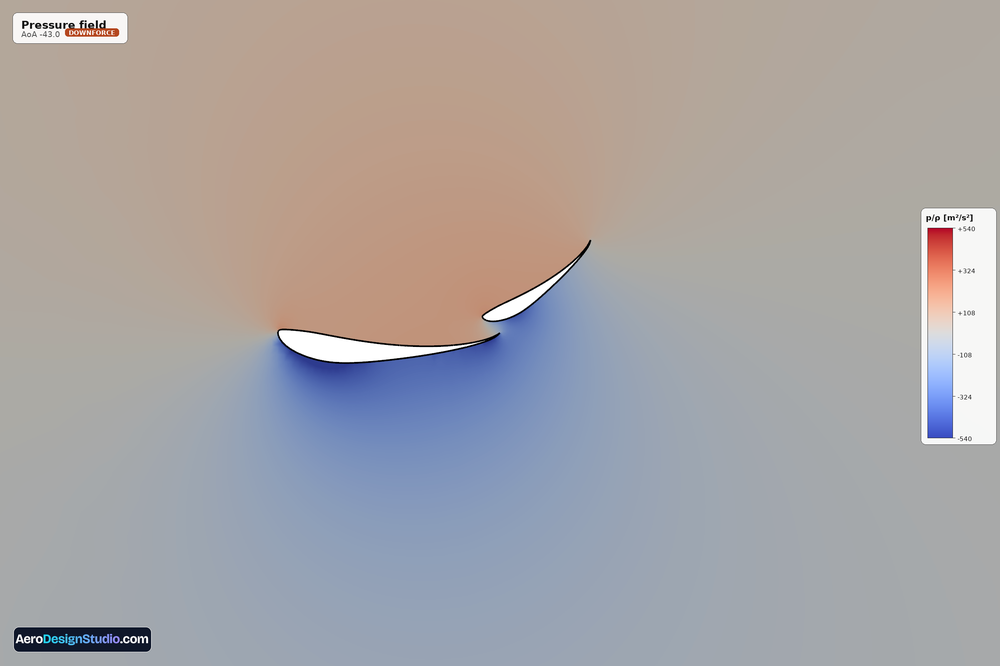
Pressure & Cp
See where the suction peak forms and how load is shared between elements, with the pressure-coefficient distribution along each surface.
Velocity & streamlines
Watch the flow accelerate through the slot and stay attached, or spot exactly where and why it separates.
Multi-point angle-of-attack sweeps, up to 10
Downforce and drag change with angle of attack, so a single point rarely tells the whole story. Queue up to ten angles in one simulation and get a complete polar (lift and drag versus angle) from a single job, instead of running and bookkeeping each point by hand. It is the quickest way to find the angle where a wing makes the most downforce before it stalls, and to compare two designs across their whole working range.
How to run a CFD simulation
No OpenFOAM install, no meshing by hand, no Linux. The whole pipeline runs in the cloud from a few choices in your browser.
-
1
Choose what to simulateA standalone airfoil, or a single, two, or three-element wing sent straight from the Wing Designer.Model
-
2
Set the flow conditionsEnter the Reynolds number for your speed and chord so the run matches your real operating point.Reynolds
-
3
Pick your angles of attackOne angle, or sweep up to ten at once to get a full polar from a single job.Sweep
-
4
Run the simulationWe build the grid around your geometry and OpenFOAM solves the flow in the cloud. Nothing to install or configure.Solve
-
5
Read the PDF reportCoefficients, Cp, pressure and velocity renders and streamlines: the whole sweep in one document.Report
Checked against wind-tunnel data
Single-element airfoils are meshed with a structured grid that wraps the section and keeps the first cell inside the viscous sublayer all the way round, then solved with a transition-sensitive turbulence model. We compare the results with published wind-tunnel measurements: the Selig S1223, Eppler E423 and NACA 2414 from the University of Illinois low-speed tests at a Reynolds number of 200,000, and the NACA 4412 from NACA Report 824 at 3 million.
It is not equally good everywhere, and we would rather say so. Around a Reynolds number of 200,000, 2D RANS over-predicts lift on highly cambered sections, much as XFOIL does, so for plain polars in that range XFOIL is quicker and just as good; CFD earns its place with the flow field and with multi-element wings. Towards stall the computed lift curve bends over later than the measured one, so the top of the curve reads optimistic, and a steady solver cannot follow the flow there reliably. Those points are graded rather than presented as fact.
Drag above a Reynolds number of about 500,000 is still being validated, so treat it as indicative there. Multi-element wings run on a different mesher and are not covered by these comparisons yet.
Every result tells you how much to trust it
CFD can hand you a confident-looking number that is wrong. We would rather tell you when that might be the case. Every angle in a sweep carries a plain-language confidence grade built from the wall resolution (y+), whether the solution actually converged, and where the angle sits in the range a steady solver handles well.
Converged, well resolved, attached flow. These are the points to design with.
The flow is starting to separate and drag climbs. The trend is right; read the value with care.
Beyond what a steady solver can resolve. It is flagged instead of guessed.
When a value does not add up
Sometimes one angle comes out inconsistent with the rest: drag that dips at that angle and nowhere else, a lift-to-drag ratio no 2D section reaches at that Reynolds number, or a point that converged far faster than its neighbours. Those points get a half-black, half-white marker and the reason in plain words. Re-run that angle rather than read it.
CFD vs XFOIL
They are complementary, not rivals. XFOIL is a panel method: near-instant and ideal for screening single airfoils in attached flow. CFD solves the full flow field, so it shows separation and the interaction between elements in a multi-element wing that a panel method can only approximate. The usual workflow: screen fast in XFOIL, then confirm and dig into the real wing in CFD.
| XFOIL | 2D CFD | |
|---|---|---|
| Speed | Seconds | Minutes |
| Multi-element wings | Approximate | Resolved directly |
| Separated flow | Limited | Visible in the field, stall flagged |
| Pressure & velocity fields | Cp only | Full field renders |
| Best for | Fast airfoil screening | Confirming the real wing |
What a simulation costs
Every run is priced in tokens, and the exact cost is always shown before you confirm. Tokens are reserved when you submit; any angle that fails is refunded to your balance automatically.
CFD: 150 tokens every month with the Pro plan, from €15 a monthper angle of attack
per angle of attack
regular price after launch: 70 tokens
per angle of attack
regular price after launch: 100 tokens
Sweeps are strictly linear: a seven-angle single-element sweep is 7 × 15 = 105 tokens, with no multipliers or hidden fees. Token packs start at 30 tokens for €5 (120 for €15, 500 for €50), and tokens never expire.
Frequently asked questions
What is CFD used for?
Is 2D CFD accurate enough for a race car wing?
How is this different from SimScale or AirShaper?
How much does a simulation cost?
Can I simulate a full multi-element wing?
How many angles of attack can I run at once?
Does it work from a Wing Designer project?
What's in the PDF report?
Keep going
Run your first CFD simulation
OpenFOAM 2D CFD in the browser: fields, sweeps and a full PDF report, at a fraction of the cost of desktop tools.